
VIN Report for Used Cars
iSeeCars.comAuto & Vehicles
4.53.25K Reviews
- Version
- 1.46
- Installs
- 500.00K
- Age Rating
- Everyone
Screenshots
Our Review of VIN Report for Used Cars
 Analysis by Appyee
When I’m considering a used car, the first challenge is separating a persuasive listing from a vehicle worth investigating. Photos and a seller’s description can tell me what the car looks like today, but not whether its history deserves a closer look. VIN Report for Used Cars is built around that gap: I enter a vehicle identification number and use a report as one input in deciding what to ask, inspect, and verify next.
I find this kind of app most useful before I travel to see a car, especially when I’m comparing several listings or buying from someone I don’t know. It is a free Auto & Vehicles app from iSeeCars.com, and its 4.5 average from around 6,200 ratings suggests plenty of shoppers find the idea useful. It has passed 500,000 installs, but popularity doesn’t make a report a substitute for seeing the vehicle in person.
Start with the car, not the report
Before opening the app, I try to get the VIN directly from the seller or from a clear photo of the vehicle’s identification plate or paperwork. A single mistyped character can send me down the wrong path, so I compare the number carefully rather than copying it from a blurry image. If the seller won’t share it, that is useful context in itself: I would pause and ask why before spending time on a visit.
Then I treat the report as a screening step, not a verdict. A clean-looking result can help me decide whether to continue, while an inconsistency gives me a specific question to take back to the seller. Either way, I still want an independent inspection and a drive. A history report can only help with information that has made its way into the records it draws on; it cannot reveal every repair, neglected service, or problem that has never been documented.
From VIN entry to a better buying decision
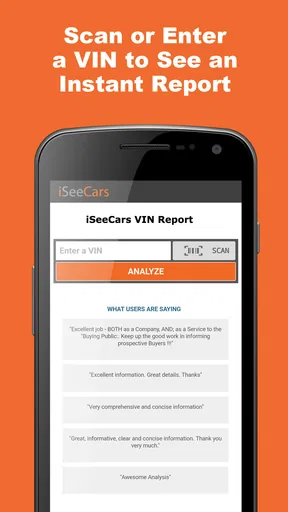
First off, installing the app was a breeze. It’s available for both Android and iOS, which is super convenient. Once downloaded, you’re greeted with a clean and user-friendly interface. No clutter, no fluff—just straight to the point. The app asks you to enter the Vehicle Identification Number (VIN) of the car you’re interested in, and then the magic happens.
The VIN is like the car’s fingerprint, and this app reads it like a pro. One thing I noticed right away is how quick and efficient the whole process is. Within seconds, I had a detailed report in front of me. This isn’t just a basic rundown; we’re talking owner history, accident reports, and even service records. It’s like having a crystal ball for cars.
Read the details as clues, not guarantees
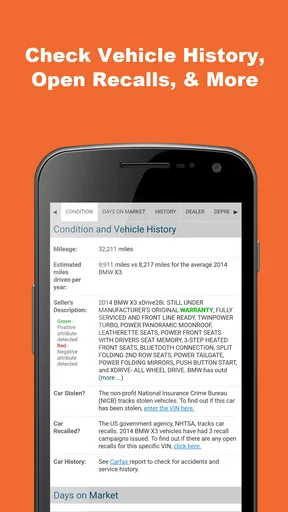
Diving deeper, the app provides a comprehensive breakdown of essential details. It includes:
- Ownership History: Know how many hands the car has passed through.
- Accident Records: Any fender benders or major crunches are right there.
- Title Information: Confirms if the car has a clean title or any red flags.
- Odometer Readings: Spot any potential tampering or inconsistencies.
- Service Records: Check if the car has been maintained regularly.
Having all this info in one place is a game-changer. It’s like getting the full story before you make a commitment. I even found myself checking details on cars I wasn’t planning to buy, just out of sheer curiosity!
The most useful move, in my experience, is to turn each entry into a question rather than jump to a conclusion. If the ownership history looks busier than the seller’s account, I ask for an explanation and supporting paperwork. If a reported accident appears, I ask what was repaired and whether there are invoices or inspection documents. If the odometer trail raises a concern, I compare it with maintenance records and the mileage shown on the car. The report gives me a more focused conversation; it cannot tell me whether the repair was done well.
Use the report to guide the handoff
A practical workflow is to check the VIN before arranging a long drive, save or note the specific points I want clarified, and then take those questions to the seller. At the viewing, I compare the VIN on the vehicle with the one I checked. That small step matters: a report is only relevant if it belongs to the exact car in front of me. I also bring the report’s questions to an independent mechanic rather than asking the app to make the final call.
Picture a weekend search for a used family car. One listing looks promising, but the seller is several towns away. I check its VIN first, then ask about any history entry that doesn’t line up with the description. If the answers are clear, I can decide whether a trip and inspection are worthwhile. If the seller’s explanation is vague, I can move on without investing an afternoon. That is where the app saves practical effort: it helps me filter candidates before I commit time, not magically remove the risk of buying a bad car.
This is also where VIN Report differs from the usual alternatives. Searching a VIN through scattered web pages can mean switching between sources and trying to understand separate fragments. A mechanic’s inspection is more valuable for the car’s current mechanical condition, but it usually comes later, after I have chosen a vehicle to examine. I see the app as an early history-checking tool that sits between browsing listings and booking an inspection—not as a replacement for either.
What the report cannot settle
Reports can be incomplete, and a missing entry should not reassure me as much as a consistent, well-documented history. Not every accident or service visit is necessarily recorded. Nor can a report judge how the car sounds, whether it pulls to one side, how it feels under braking, or whether a repair has left a cosmetic mismatch. I use the app to decide what deserves scrutiny, then rely on documents, a careful viewing, and a qualified inspection to answer the questions that records cannot.
There is a cost consideration too. The app is free to install, but in-app purchases are listed from $9.99 to $38.99 per item. I would check what a particular report or purchase includes before paying, especially if I’m screening multiple cars. If I only need a quick first filter, I may prefer to ask the seller for existing records or use another available source before deciding whether a paid report is worthwhile. The app is rated for Everyone, and its current version is 1.46, but the more important question for me is whether its report gives enough relevant context for the specific car I’m considering.
If I’m buying from a dealer who already provides a detailed history document, I would compare the VIN and key entries rather than automatically buy another report. If I’m looking at a classic, a heavily modified vehicle, or a car with a complicated cross-border history, I’d be especially cautious about treating one database as complete; specialist records and an expert inspection may matter more. And if I’m not ready to contact sellers or arrange viewings, browsing reports for curiosity can be interesting, but it won’t move a purchase decision forward.
Why VIN Report for Used Cars Stands Out
In a sea of vehicle history apps, what makes this one stand out? For starters, the data accuracy is impressive. I cross-referenced a couple of VINs with other sources, and the app held up every time. Also, the interface is intuitive. You don’t need to be a tech wizard to navigate through the app, which is always a plus.
I also appreciated the transparency. The app doesn’t bombard you with ads or push unnecessary features. It does what it says on the tin: provides thorough vehicle reports. And let’s not forget the peace of mind it offers. Knowing you’re not buying a lemon is invaluable.
My main caution is to keep that peace of mind in proportion. A report that matches the seller’s account is reassuring, but it is not proof that the car is mechanically sound; a mismatch is a reason to investigate, not automatic proof of wrongdoing. I also wouldn’t assume the app is the right choice for every shopper: someone who wants hands-on mechanical advice should prioritize an inspection, while someone who already has reliable documentation may get more value from checking the car itself. For most used-car shoppers, though, an organized history check can make the next conversation sharper.
A useful first check, not the final word
Wrapping this up, VIN Report for Used Cars is a must-have for anyone in the market for a used car. It’s reliable, fast, and provides all the crucial data you need to make an informed decision. Plus, it’s got that user-friendly vibe that makes it accessible to everyone.
I’d describe it more carefully as a useful first check than a complete buying solution. I’d reach for it when a particular car has caught my eye and I want a history-based reason to proceed, ask harder questions, or walk away. I’d skip relying on it alone when the vehicle’s records are likely to be unusual or when its present condition is the central concern. That distinction keeps the app in its strongest role: helping me spend my time and inspection budget on the right candidates.
So, next time you’re eyeing that sleek sedan or rugged SUV, whip out your phone and give this app a whirl. You’ll be armed with all the info you need to drive away with confidence. Happy car hunting!
Verdict
Strengths of VIN Report for Used Cars
- Comprehensive vehicle history reports.
- Easy-to-use interface for all users.
- Fast report generation times.
- Accurate accident and repair data.
- Supports multiple vehicle checks.
Limitations of VIN Report for Used Cars
- Limited free features available.
- Occasional data discrepancies.
- Subscription required for full access.
- Not all models supported equally.
- Customer support response times vary.
Similar Picks in This Category
View All
Android Auto
Google LLC4.1

maxim — order a taxi & food
PT. SITO4.7

Штрафы ГИБДД: проверка с фото
Pays LLC – Штрафы ГИБДД4.7

Номерограм – проверка авто
Авто Ассист4.8

Дром Авто
Дром4.9

Frequently Asked Questions
What information does the VIN Report for Used Cars app provide?
The VIN Report for Used Cars app provides detailed information about a vehicle's history by analyzing its Vehicle Identification Number (VIN). This includes accident history, title status, odometer readings, and service records. This information helps potential buyers make informed decisions by unveiling any hidden issues that could affect the vehicle's value or safety.
Is the VIN Report for Used Cars app free to use?
The VIN Report for Used Cars app offers both free and paid versions. The free version provides basic information, while the paid version offers comprehensive reports with detailed insights. Users should review the app's pricing structure to determine which version suits their needs best before making a purchase.
How accurate is the information provided by the app?
The VIN Report for Used Cars app sources its data from reliable databases and government records, ensuring a high level of accuracy. However, users should be aware that the app's accuracy may depend on the availability and completeness of data in these databases. It’s always a good idea to verify critical information independently.
Does the app require an internet connection to function?
Yes, the VIN Report for Used Cars app requires an internet connection to access and retrieve vehicle data from its databases. Users should ensure they have a stable connection to download complete reports. Offline access is limited, as the app needs to update data in real-time to provide the most current information.
Can I use the app for vehicles outside the United States?
The VIN Report for Used Cars app is primarily designed for vehicles registered in the United States. While it may provide some information for vehicles in other countries, the completeness and accuracy of the data may vary. Users looking for international reports should verify the app’s coverage for specific regions.
